I have spent the last few weeks trying to untangle some long-held beliefs about the best way to display and manipulate information on computer screens. These beliefs come from my first experience working in games and using Coherent UI1, a middleware for authoring video game UI in HTML/CSS and JavaScript. I'm sure part of it is nostalgia or a belief that the grass is greener, but I also feel that some of the other stacks I've used over the years in games cannot be the best way to make an interface.
I started from a place of Document vs Canvas authoring as a paradigm. On one side we had Markup, primarily HTML but also other text files with semantic structure like XML and XAML. On the other side we had Object-Configured UI created in editors and serialized as assets, such as Unreal Motion Graphics (UMG). There is a third format here, Code, UI written straight in C with no separate authoring format, which I don't have much exposure to.
As I continued to untangle these UI paradigms I also had to get my vocabulary straight around state management. I have a gut feeling that Declarative UI must be better. It's my understanding that the biggest apps and software in the world today use something closer to declarative state management, you don't want your Facebook UI to own the Facebook state. Games are not Facebook but we generally follow imperative state management. UI teams own the UI part of the software and often solve things in UI. There is an entire community called "We Can Fix It In UI" and while it is a joke about smoothing over game design with UI, I find it also true in the tech design space.
Lastly there is a third axis in Runtime Model. I'm not going to spend too much time thinking about that, but it is my understanding you have either Immediate UI which is redrawn every frame, or Retained UI which most UI systems are, persisting elements between frames. While I have spent a good portion of my professional career being concerned with UI performance, it's usually to do with memory concerns around raster images or the number of pixels on screen in any given frame.
The three axes are independent. You can have:
                  ┌──────────────┬────────────┬────────────┐
                  │  Authoring   │   State    │  Runtime   │
                  │   Format     │ Management │   Model    │
    ┌─────────────┼──────────────┼────────────┼────────────┤
    │ HTML/CSS/JS │   Markup     │ Imperative │  Retained  │
    │ React/JSX   │   Markup†    │ Declarative│  Retained  │
    │ SwiftUI     │   Code       │ Declarative│  Retained  │
    │ RmlUI       │   Markup     │ Declarative│  Retained  │
    │ Unity uGUI  │   Object‡    │ Imperative │  Retained  │
    │ Unreal UMG  │   Object‡    │ Imperative │  Retained  │
    │ ImGui       │   Code       │ Declarative│  Immediate │
    │ QuakeSpasm  │   Code       │ Imperative │  Immediate │
    │ XAML/WPF    │   Markup     │ Declarative│  Retained  │
    │ Qt/QML      │   Markup     │ Declarative│  Retained  │
    └─────────────┴──────────────┴────────────┴────────────┘

    † JSX is markup-in-code, so hybrid
    ‡ "Object" = configured in editor, serialized as prefab/asset
Today I want to argue primarily about Axis 1, that markup is the best way to author UI in 2026. I also think declarative state management is the better model - it forces a cleaner separation of concerns. This comes from a decade of experience using proprietary and commercial UI solutions: Coherent UI with vanilla JavaScript and jQuery, proprietary game engines like Snowdrop and Slipspace, and Unreal Engine 5 today. Lastly, I believe AI is good at markup including HTML and other forms of structured semantic data. If you disagree I'd be curious as to why, but this belief is core to the rest of my arguments.
Why Markup
Danny McGee has a fantastic blog post called Unreal Engine Deserves a Better UI Story. The first time I read it, it felt like someone had written a postmortem over my experience using UMG these past few years and put my exact feelings on paper. I want to borrow an example from him, but I highly recommend you read his post.
To create a button in HTML it's trivial. You create the tag and then write a few lines of CSS to style it.
.my-button {
    padding: 0.5em 1em;
    border-radius: 0.25em;
    background: #0066CC;
    color: white;
}
<button class="my-button">Click Here</button>
Write it. See it. Inspect Element and tweak as needed. Done.
There are a dozen ways to skin a button in Unreal and some are very powerful. Personally I have spent a lot of time over the past few years up-skilling my shaders, or as Unreal calls them, "Materials." What all these methods of creating a button in Unreal share is a lack of good primitives purpose-made for creating UI. The workflow often includes someone authoring a visual target in another toolset (Photoshop or Figma) and then you need to figure out the best way to deliver on that vision. The UI Material Lab2 demo from Epic is a wealth of great primitives for shader-based UI.
The point isn't a better visual editor. It's that markup is something both you and an AI can read and write. It's easier to diff and version control, and AI is good at it. With patterns like MVVM (Model-View-ViewModel) you can scaffold a UI quickly, throw away the parts that don't work, and still preserve a data contract that the final production UI can use.
Also, I don't really believe in WYSIWYG editors. I'd always rather have a hot reload and/or an easy test case.
Why Declarative
Every UI developer in games has heard this. Something doesn't feel right in the game, and the solution is "just add some UI feedback." Health feels too swingy? Add screen shake and vignette. Players don't understand the cooldown? Add a tooltip. The core system stays unchanged, the UI patches over it.
This isn't always wrong. Sometimes UI is the right place to solve a feel or legibility problem. The problem is when UI starts owning state and logic that doesn't belong to it.
Examples of things UI should not own.
- Tracking ability cooldowns instead of just displaying a timer the game provides
- Managing the player's loadout, not just showing it
- Evaluating whether game conditions are met when that logic has nothing to do with display
When UI owns this stuff, you can't throw the UI away. The game breaks. Your "view layer" has become load-bearing, and now every change to game logic requires a UI programmer in the room.
The Data Contract
The fix is straightforward. The game is the backend, the UI is the frontend. The game publishes state through a defined set of values the UI can read and display, and the UI never reaches past that contract.
Games resist this for practical reasons. Everything runs in one process, the UI programmer sits ten feet from the gameplay programmer, and it's faster to just grab the variable directly. On a small team with a short timeline, that's sometimes the right call. But it doesn't scale, and it makes the UI impossible to replace.
A declarative model enforces this naturally. When your UI is a template that says {{ health }} and the engine provides the value, there's no place for the UI to sneak in extra logic. The binding is the contract.
vkQuake: A Proof of Concept
I wanted to test these ideas against a real game with real constraints.
vkQuake is a Vulkan-based source port of Quake. The engine is pure C. The original UI is about as far from document-authored as you can get: hardcoded draw calls, pixel coordinates, immediate-mode rendering. No separation between game state and presentation. The UI is the code that draws it.
Quake is a great candidate for this kind of modernization for a few reasons. The game state is finite and well-understood, health, armor, ammo, a handful of weapons, some items. The game loop is simple. The surface area is small enough that you can actually finish. And because the original UI is so minimal, the contrast with a document-authored approach is as clear as it gets. I also already know this engine. I make Quake maps. It's a project I actually care about, not a synthetic test case.
I integrated RmlUI, an open-source HTML/CSS UI framework, into the engine. RmlUI is a C++ library, so I needed an integration layer, roughly 4,500 lines of C++17 sitting between the C engine and RmlUI's API, bridged through an extern "C" interface. The engine calls simple C functions like UI_Update() and UI_Render(). It has no idea there's C++ on the other side.
Most of that integration layer was AI-written. Quake's C is simple code, no deep inheritance hierarchies, no template metaprogramming. A function does what it looks like it does, and that turns out to matter a lot for AI-assisted development.
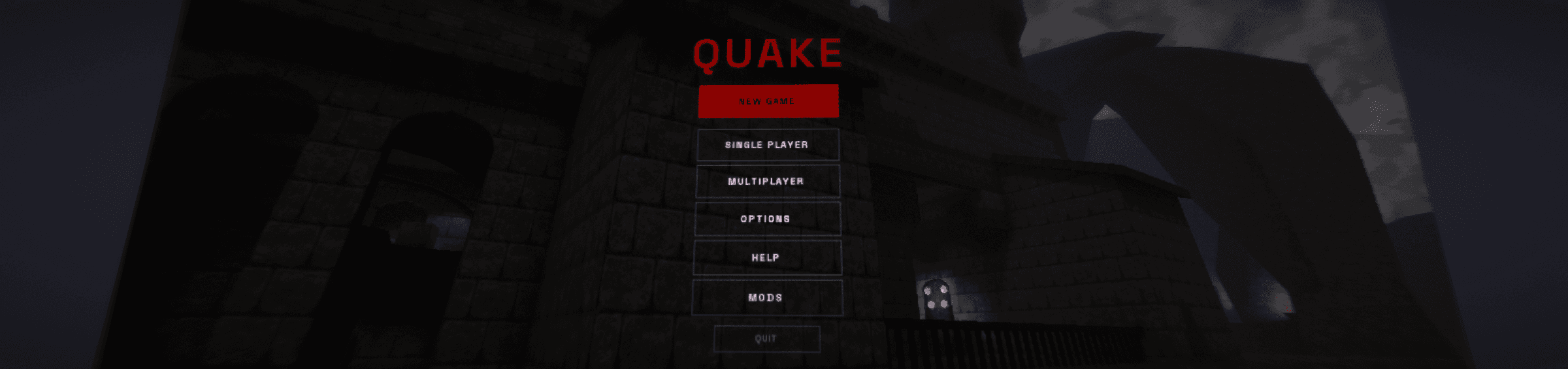
The UI itself is authored in RML (RmlUI's HTML dialect) and RCSS (its CSS dialect). A menu is a .rml file. A style is a .rcss file. Here's the actual main menu:
<div id="menu-content">
    <h1 id="game-title">QUAKE</h1>
    <p id="tagline">Project Tatoosh</p>

    <div id="menu-buttons">
        <button class="btn-primary" onclick="new_game()">NEW GAME</button>
        <button class="btn" onclick="navigate('singleplayer')">SINGLE PLAYER</button>
        <button class="btn" onclick="navigate('multiplayer')">MULTIPLAYER</button>
        <button class="btn" onclick="navigate('options')">OPTIONS</button>
        <button class="btn" onclick="navigate('help')">HELP</button>
        <button class="btn-quit" onclick="navigate('quit')">QUIT</button>
    </div>
</div>
Styled with a brutalist design, wire-frame buttons, Space Grotesk, Quake red:
.btn {
    display: block;
    width: 200dp;
    margin-left: auto;
    margin-right: auto;
    margin-bottom: 6dp;
    padding-top: 12dp;
    padding-bottom: 12dp;
    background-color: transparent;
    border: 2dp #333333;
    color: #ffffff;
    font-family: Space Grotesk;
    font-size: 14dp;
    font-weight: bold;
    letter-spacing: 2dp;
    text-transform: uppercase;
    text-align: center;
}

.btn:hover {
    background-color: #1a1a1a;
    border-color: #ffffff;
}

.btn-primary {
    background-color: #8b0000;
    border: 2dp #8b0000;
    color: #000000;
}
That's a menu. When I wanted to change the look, I edited the stylesheet and hit a hot reload key. No recompile. No relaunch. The design language lives entirely in RCSS, swap the stylesheet and the same markup looks completely different.
Hot reload changed how I worked on everything after the first few days. When you can see a style change in-engine in under a second you just try things. You don't plan out whether a margin should be 8dp or 12dp, you try both. This is the feedback loop that makes web development feel fast and it's completely missing from game UI workflows. Once you've worked this way it's hard to go back.
The Data Contract in Practice
Game state flows to the UI through a data model that syncs every frame. The engine pushes cl.stats[], cl.items, and level info into a GameState struct, and a data model maps those values to named bindings that RML documents can reference. Here's what the health and armor cluster looks like in the modern HUD:
<div class="corner-stats hud-bottom-left">
    <div class="cluster-content">
        <div class="corner-stat health" data-class-low="health < 25">
            <span class="value">{{ health }}</span>
            <span class="label">HEALTH</span>
        </div>
        <div class="corner-stat armor" data-if="armor > 0"
             data-class-armor-green="armor_type == 1"
             data-class-armor-yellow="armor_type == 2"
             data-class-armor-red="armor_type == 3">
            <span class="value">{{ armor }}</span>
            <span class="label">ARMOR</span>
        </div>
    </div>
</div>
The UI doesn't poll for health. It doesn't have a reference to the player entity. It doesn't know what health means or how damage works. It just says "show me the value called health, add a low class when it's under 25, only show armor when it's above zero, and color it based on armor type." The engine provides the values. The markup describes the rules. Neither knows about the other.
There are around 50 of these bindings, including computed ones. {{ weapon_label }} resolves the current weapon index to a display name through a lambda in the C++ data model. {{ ammo_type_label }} figures out whether to say SHELLS, NAILS, ROCKETS, or CELLS. The UI doesn't know or care about that indirection, it just reads the binding.
The data contract also flows the other direction. Console variables like mouse sensitivity, volume, and graphics settings sync to UI elements through a cvar binding system:
<input type="range" min="1" max="11" step="0.5"
       data-value="mouse_speed"
       data-event-change="cvar_changed('mouse_speed')"/>
The UI reads the current cvar value when a menu opens and writes it back when the player adjusts the slider. The binding manager handles the two-way sync and suppresses feedback loops. This is how the entire options menu works - graphics, sound, controls, all driven by the same cvar binding pattern. No custom code per setting.
Loading diagram
An audit of the options menus turned up duplicate mouse settings in two places and fullscreen/v-sync toggles that were broken because they didn't trigger the required vid_restart. The fix was three .rml file edits, zero C++ changes. Remove the broken rows, consolidate the duplicates, reload. The data model defines what's available; the RML documents define what's visible. If no document references a binding, it just goes unused. Total time from identifying the problem to verified fix: minutes, not a rebuild cycle.
The Post-Process Detour
Because the UI renders to its own off-screen texture separate from the game world, there's an opportunity to do something fun with it. A post-process shader composites the UI onto the game frame, and I used that pass to add barrel warp distortion, bending the UI slightly like it's projected onto a curved screen. On top of that there's chromatic aberration, red, green, and blue channels sampled at slightly different warp offsets so bright UI elements pick up color fringing at the edges. Subtle, analog, CRT-adjacent.
Push constants also include ui_offset_x and ui_offset_y, which shift the entire UI texture per-frame. This drives HUD inertia, when you jump, the HUD lags behind slightly and catches up with a critically-damped spring. When you turn, it sways. Small thing, but it makes the UI feel like it exists in the world rather than being painted on your monitor.
None of this is groundbreaking shader work. But the same HUD document works with or without these effects. Here's the full UI in motion — menus, HUD, data bindings, post-process, all running in-engine:
Working with AI
Early on I was asking big open-ended questions, audit the codebase, tell me what's here, what would it take to integrate RmlUI. Then I'd point at something and say "fix that." As I went I spent more time on the plan before letting the agent write code. I proved the pattern on the main menu and the HUD first, then once the architecture was solid I could hand off larger sections. Eventually I had an agent port entire menu flows, multiplayer, options, save/load, running for 41 minutes straight without me touching it. The key was setting up rules: run the build after every change, and if it doesn't compile, fix the issue before moving on. That guardrail let the agent stay productive without drifting.
Where This Leaves Me
UI wants to be a document.
Not everything is better as a document. Anything that needs sequenced animations or fine-grained timing pushes against what markup is good at, and you start writing more code around the document than in it. The bigger gap isn't technical though. RmlUI, Coherent, NoesisGUI are real tools that ship in real games. But game teams hire for Unreal and Unity skills, art pipelines produce textures not stylesheets, and changing the authoring format means changing who can author. Unity's UI Toolkit already uses UXML and USS, so the pattern is converging.
What I'd do differently next time is start from the data contract. On an existing codebase the state already exists, it's just not formalized. AI can read the globals, the structs, the stat arrays and generate the contract for you. That's effectively what happened here: the agent read cl.stats[] and the item bitflags and produced the GameState struct with 50+ named bindings. I should have started there explicitly instead of arriving at it through the integration work. Define what state the UI needs to see, formalize that interface, and then the authoring format almost doesn't matter. You can prototype in ImGui, scaffold in HTML, ship in whatever your team knows. The contract comes first.
Author it like one.
-b
Footnotes
-
Coherent UI was a middleware by Coherent Labs for rendering HTML/CSS UI in game engines. The company now ships Gameface, its successor. ↩
-
UI Material Lab — a free collection of 40+ material functions and 100+ examples for building UI materials in Unreal Engine. ↩